Guides
Leaving DistroKid: switch music distributor without losing streams
You can switch music distributor without losing streams if the new delivery carries the same ISRC for every track and the same UPC for every release. Take the old version down only once the new one is live, and play counts and playlist placements stay attached.
Switching distributor is a move, and the order you do it in matters.
Why ISRC and UPC decide whether your streams survive
An ISRC identifies one recording and, according to IFPI, stays fixed when it moves between services; a UPC identifies the release. Spotify links the old and new versions when they match on audio, duration, title and artist name, so the play count carries over.
Since April 2024, Spotify only pays royalties on tracks with at least 1,000 streams in the previous 12 months, counted per ISRC. A track under a new code starts from zero.

A recording keeps its identity, and its ISRC, whoever delivers it.
Before you start: export what you have
- Every ISRC and UPC, with titles exactly as they appear in stores.
- Masters (WAV or FLAC) and 3000x3000 artwork.
- Credits, splits and lyrics as plain text.
- Written agreement from any co-owner of the rights.
The safe order, step by step
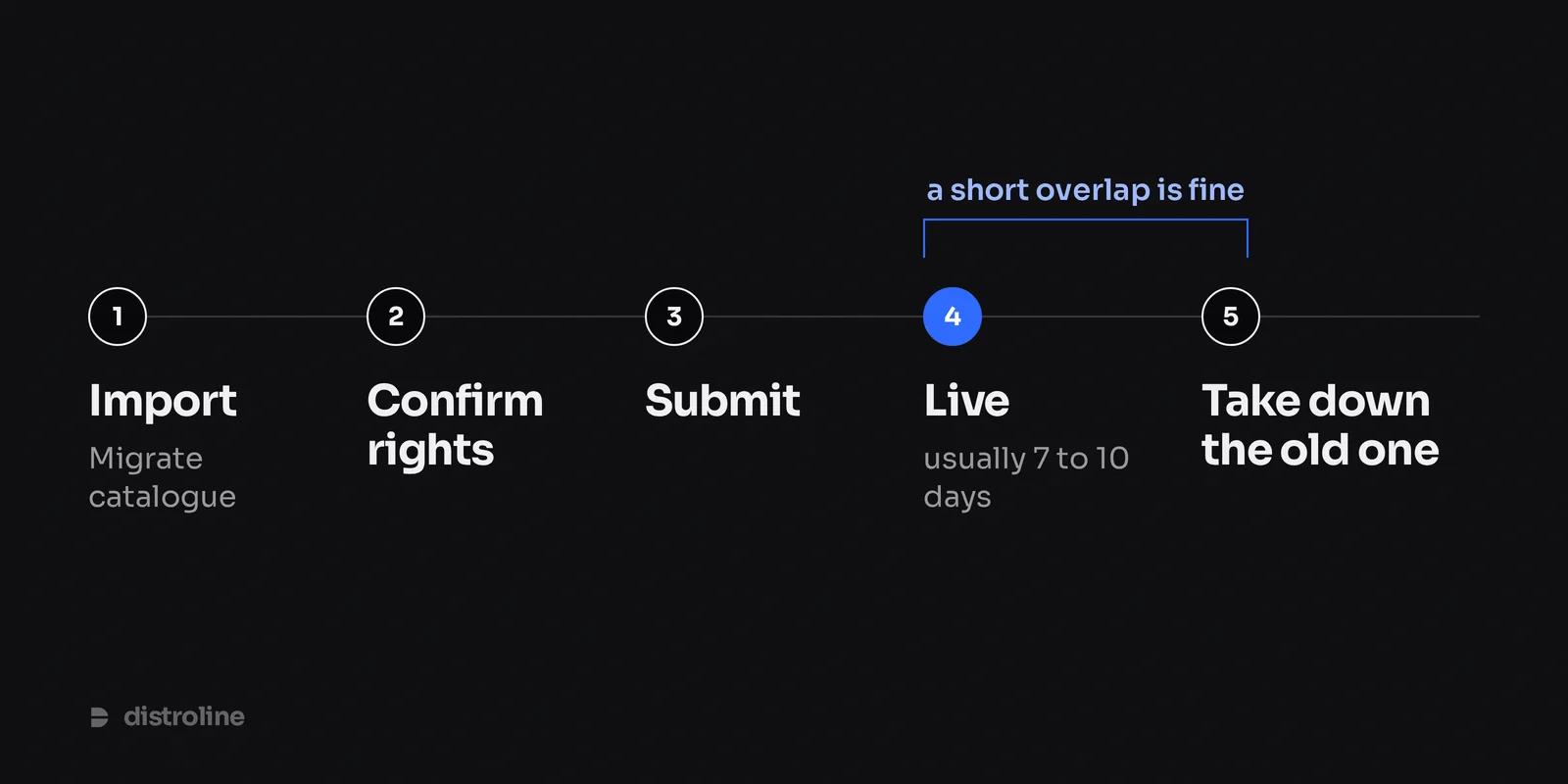
Take the old release down last, only after the new one is live.
- Import with Migrate catalogue. Find your releases through Spotify; metadata, ISRCs, UPCs and credits come with them. If a track's audio cannot be imported, you are asked for the master. (In Portuguese: migrar o catálogo.)
- Confirm the rights and check titles and credits against your export.
- Submit. Every release is reviewed before delivery.
- Wait until it is live, usually 7 to 10 days, and check the old play counts show on Spotify. A short overlap is expected.
- Then delete it at DistroKid, keeping the subscription paid until the last takedown: if the fee is not paid, releases may be removed.
YouTube Content ID and lyrics
Content ID expects one owner per recording in each territory, and two claims create an ownership conflict. If DistroKid has your tracks in Content ID, have them removed with the takedown and register them nowhere else until that is confirmed.
Lyrics may not follow a new delivery. Check each store a week after the takedown and supply them again where missing.

Content ID follows your recordings into other people's videos, so it needs a single owner.
Royalties still owed at DistroKid
DistroKid says you still receive earnings for a deleted release for the time it was live, even after you stop paying. Keep the account open for the final payments.
At Distroline, most stores report around 45 days after the month ends; verified earnings reach your in-app wallet and you withdraw by SEPA or PayPal.
What it costs
- DistroKid, per its pricing page in Europe on 29 September 2026: Musician €23.99 a year (1 artist), Musician Plus €42.99 (2), Ultimate €81.99 (up to 100), all keeping 100%.
- Distroline: Grátis €0 (you keep 90%), Coliseu €14.99 a year and Stage €39.99 a year (you keep 100%), VAT included.
- Not like for like: DistroKid tiers follow the number of artist names. Distroline takes card, SEPA Direct Debit, Apple Pay, Google Pay, Link or MB WAY, answers in Portuguese at apoio@distroline.com, and your first paid plan by card starts with 30 days free.
New releases during the move
Put anything new straight on Distroline, 3 to 4 weeks ahead: Spotify needs at least 7 days to take a pitch for Release Radar, and the rest lets you run a free pre-save page on dline.fm. See our Spotify release guide (in Portuguese).
Checklist
In short: keep every ISRC and UPC, wait until the new release is live with its play counts, and only then take the old one down.
- Export codes, masters, artwork, credits and lyrics.
- Import with Migrate catalogue and check every code.
- Remove Content ID at DistroKid, then delete the release.
- Keep DistroKid paid until the last takedown.
- Pick a plan (or compare DistroKid alternatives, in Portuguese) and create your account.
Frequently asked questions
Will I lose my Spotify playlist placements when I switch?
Not if the new delivery keeps the same ISRC, audio, title, duration and artist name. Placements and play counts belong to the recording, so they carry over once Spotify links the two versions.
Do I need new ISRC codes?
No. Migrate catalogue imports the codes you already have. Distroline only assigns an ISRC or UPC when a track or release has none.
How long does the whole switch take?
Each release usually goes live 7 to 10 days after you submit it. Add a few days to check the stores and take the old version down.
Comentários